
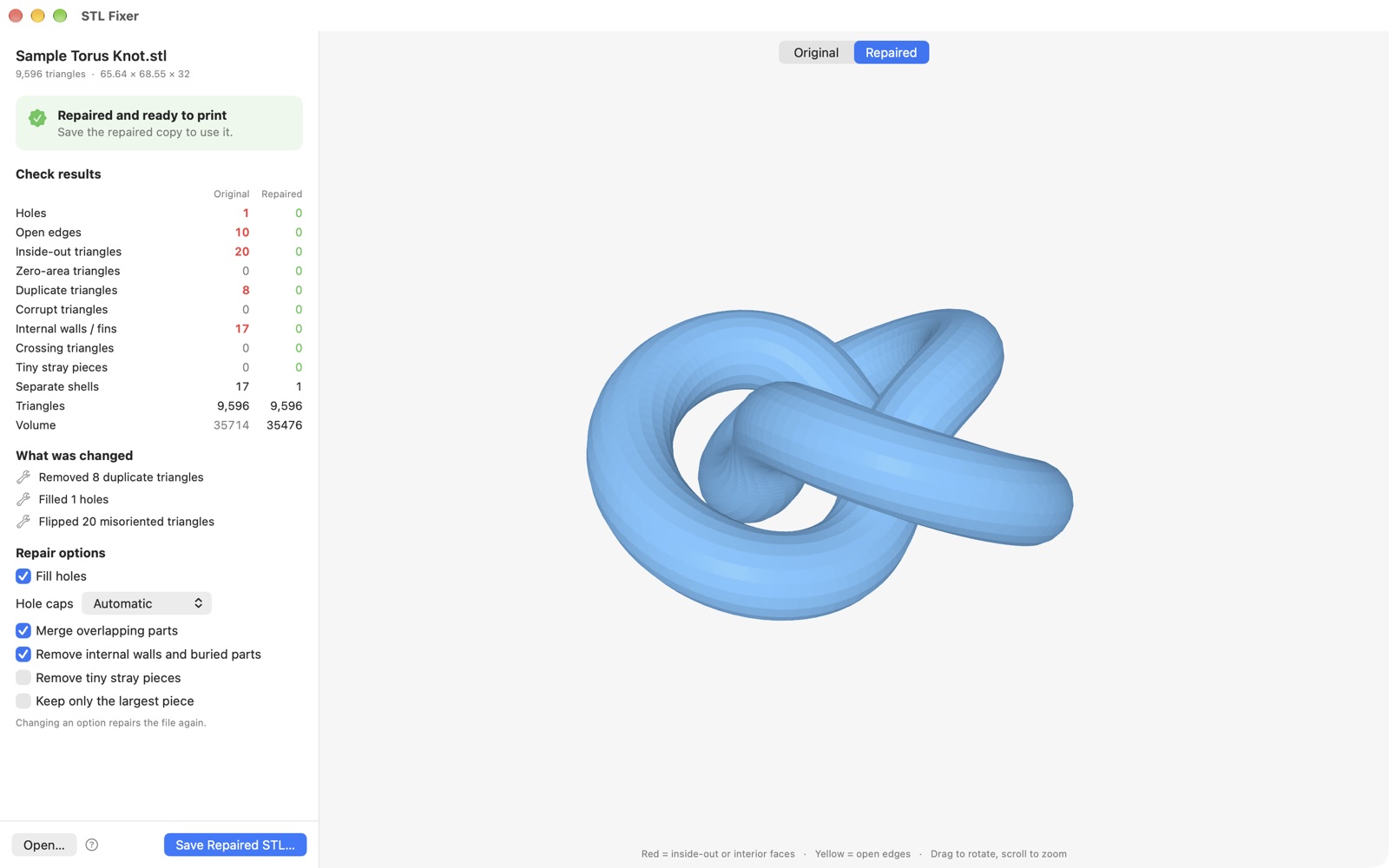
A clear verdict, a before-and-after count of every defect, and a 3D view of the result.
A slicer will happily accept a broken mesh and then print it badly: missing walls, gaps, stringy blobs, or a model that fails halfway. STL Fixer finds the defects that cause those failures, repairs them, and shows you exactly what changed next to the original. Your original file is never touched; you save a repaired copy.
Prints that don't fail
Every hole gets a cap and every shell points the right way, so you get a closed solid your slicer understands.
Seconds, not sessions
Drop a file on the window and it's checked and repaired straight away. No menus to learn.
See what changed
Flip between Original and Repaired with the camera held still. Inside-out faces show red, open edges yellow.
Private by design
Runs entirely on your Mac. Nothing is uploaded, no account, no tracking.
Every problem it fixes
STL Fixer checks for each of these on every file, repairs what it can, and tells you if anything is left.
Holes and gaps
- Holes and open edges: every hole gets a cap, flat or curved to follow the surrounding surface.
- Cracked seams: corners that should meet but sit a hair apart are welded, so hairline gaps close.
Faces pointing the wrong way
- Inside-out triangles: faces are turned so every shell points outward.
- Non-orientable patches (twisted, Möbius-like surfaces with no clear inside and outside) are detected and reported, so you know before you slice.
- Wrong or missing normals are recomputed for every triangle in the saved file.
Bad geometry
- Non-manifold edges: internal walls and fins left behind when parts are joined, where more than two faces share an edge.
- Overlapping and self-crossing parts: intersecting shells are cut apart and merged into one clean outer skin.
- Buried parts hidden inside other solids are removed, while deliberate hollows are kept.
- Zero-area (degenerate) triangles squashed to a line or a point.
- Duplicate triangles stacked on top of each other.
- Tiny stray pieces from scans and sculpting tools are flagged, and removed if you choose. Parts that only touch at an edge are recognised and left alone.
Damaged files
- Corrupt triangles with impossible (NaN or infinite) coordinates.
- Truncated files and files whose header claims the wrong triangle count.
- Binary and ASCII STL are both read; the repaired copy is always a clean binary STL.

Drop a file, or try the built-in sample to see a broken model repaired.
You stay in control
- Choose flat or curved hole caps.
- Turn merging of overlapping parts and removal of stray pieces on or off.
- Every change to an option repairs the file again instantly.
- Reads binary and ASCII STL and writes binary STL with freshly computed normals, for every popular slicer.
- A full illustrated help guide is built in.
Install
- Download STL-Fixer-1.0.dmg and open it.
- Drag STL Fixer onto the Applications folder.
- Open STL Fixer and drop an STL on the window, or choose Try a Sample File to see it work first.
The download is signed with the developer's Apple Developer ID (Raul Silva) and notarized by Apple, so it opens without any security warnings.
STL Fixer 1.0 · macOS 13 Ventura or later · Universal (Apple silicon and Intel) · Free download
Help
See the Support page for common questions, or email [email protected]. The Privacy Policy is short: STL Fixer collects nothing.